Home / Guides / Email marketing calendar template
Free template
12-month email marketing calendar template
Plan your sends a year ahead with one row per email and one tab per month. Download the template free, no sign-up, and fill in your own dates and offers.
Published · Updated
Download the template
Get your free email marketing calendar template right here. There is no form and no sign-up. Choose the format that fits your planning tools best, whether you plan in Excel, in Google Sheets (open the .xlsx there), or on a printed wall calendar.
- Excel template (.xlsx): year view, 12 month tabs, dropdowns, date formulas and color key. Opens in Excel, Google Sheets (upload, then open) and Numbers.
- CSV (.csv): the campaign columns with a row per month, for any spreadsheet or project tool.
- Printable PDF: 13 pages, Letter landscape. One year view plus one page per month.
No email gate, no account.
What is in the template
Many marketing calendar templates are built for massive teams with complex workflows. We built this email marketing calendar for small businesses with one main list. It gives you a clear place to plan, schedule, and track your email campaigns without extra clutter.
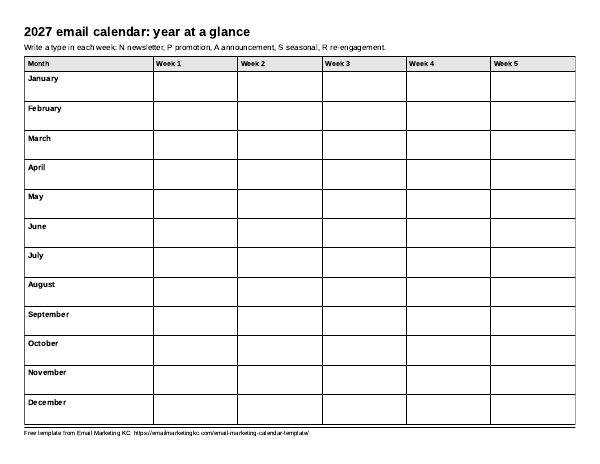
Year at a glance
The first tab is a 12-month by weeks grid. It includes a color key for different email types, and the cells color automatically with conditional formatting. You can see your entire annual marketing strategy and promotional rhythm on one screen.
Monthly tabs
Each month has its own tab for detailed content planning. Every monthly tab includes a theme prompt to spark ideas for your marketing content, plus a row of public dates to consider, not a send rule. Simple date formulas calculate your copy due date and approval due date based on the lead time you enter, and a status counter tallies your progress.
Campaign columns
Each row in the monthly schedule represents one marketing campaign. The calendar template includes these columns to organize your email content and tracking:
- Send date: The day the email goes out.
- Send time and time zone: The exact time you plan to send.
- Campaign name: An internal name for the email campaign.
- Type: Newsletter, promotion, announcement, seasonal, or re-engagement.
- Audience or segment: Who receives the email.
- Goal: What you want the email to do.
- Offer or theme: The main topic, event, or promotional hook.
- Subject line: The line subscribers see in their inbox.
- Preview text: The snippet that follows the subject line.
- Owner: The person writing and building the email.
- Copy due: Calculated automatically from your send date minus your lead time.
- Approval due: Calculated automatically from your send date minus your second lead time.
- Status: Idea, drafting, review, scheduled, or sent.
- Notes: Extra context, related social media posts, or reminders about automated emails.
- Result notes: Space to record your own numbers and results after the send.
How to fill it in
You can set up your email marketing calendar in one short sitting. Follow these five steps to build a practical content calendar.
- Pick your format and make a copy. Download the Excel file, or upload it to Google Drive and open it with Google Sheets. Save it where your team can find it.
- Mark your major business dates on the year view. Add your known sales, busy seasons, product launches, or local events first.
- Read the monthly prompts and pick one theme per month. Use the questions on each monthly tab to decide what your audience needs to hear from you.
- Fill in the campaign rows for the next month. Choose your send dates, pick the campaign type, write a working subject line, and enter your lead times so the sheet calculates your copy and approval deadlines.
- Update the status and result notes as you go. Move each row from idea to sent, and jot down what you learned in the result notes column to help with future planning.
Month by month theme prompts
Staring at a blank promotional calendar template is hard. Use these twelve monthly questions to plan useful email content for your subscribers. The public holidays listed under each month are dates to consider, not a send rule.
January
What does your customer want to start or fix this year?
2027 dates to consider, not a send rule:
- Fri Jan 1: New Year's Day (federal)
- Mon Jan 18: Birthday of Martin Luther King, Jr. (federal)
February
What can you thank customers for?
2027 dates to consider, not a send rule:
- Sun Feb 14: Valentine's Day
- Mon Feb 15: Washington's Birthday (federal)
March
What changes for your business in spring?
2027 dates to consider, not a send rule:
- Sun Mar 28: Easter Sunday
April
What question do customers ask most? Answer it.
No public dates listed this month. Use your own business dates.
May
What is behind the scenes at your business?
2027 dates to consider, not a send rule:
- Sun May 9: Mother's Day
- Mon May 31: Memorial Day (federal)
June
Mid-year check: what offer is working for you?
2027 dates to consider, not a send rule:
- Sat Jun 19: Juneteenth (federal; observed Fri June 18)
- Sun Jun 20: Father's Day
July
What summer timing matters to your customers?
2027 dates to consider, not a send rule:
- Sun Jul 4: Independence Day (federal; observed Mon July 5)
August
Back to school or back to routine: what helps?
No public dates listed this month. Use your own business dates.
September
Fall planning: what should customers book or buy before year end?
2027 dates to consider, not a send rule:
- Mon Sep 6: Labor Day (federal)
October
What story or seasonal tie-in fits your brand?
2027 dates to consider, not a send rule:
- Mon Oct 11: Columbus Day (federal)
- Sun Oct 31: Halloween
November
Holiday shopping and gratitude: what will you offer, if anything?
2027 dates to consider, not a send rule:
- Thu Nov 11: Veterans Day (federal)
- Thu Nov 25: Thanksgiving Day (federal)
- Fri Nov 26: Black Friday
- Mon Nov 29: Cyber Monday
December
Year in review and next-year preview.
2027 dates to consider, not a send rule:
- Sat Dec 25: Christmas Day (federal; observed Fri Dec 24)
- Fri Dec 31: New Year's Eve
Pre-send checklist
Before you move any campaign row to scheduled, run through these practices to catch mistakes before your emails go out:
- Subject line and preview text are written and checked for typos.
- Every link in the email is tested and goes to the right page.
- A working unsubscribe link is present and easy to find.
- A valid physical postal address is in the footer, as required by the FTC CAN-SPAM Act compliance guide.
- All images have clear alt text for subscribers who have images turned off.
- You sent a test email to yourself and checked it on both a phone and a desktop screen.
- The right audience or segment is selected for the send.
- The scheduled send time and time zone are confirmed.
Embed or share the calendar
Want to share this marketing calendar template with your readers, local business group, or team? Copy the code below to embed the calendar card on your site.
Keep the credit link when you use the card.
FAQ
Here are answers to common questions about using calendar templates for your digital marketing and email planning.
What is an email marketing calendar?
A schedule of planned email sends with dates, audience, goal and owner for each.
How far ahead should I plan emails?
Many teams plan the next month or quarter in detail and the rest of the year as themes; pick what you can keep up with.
Should automated emails go on the calendar?
Always-on automations like welcome series usually live outside the calendar; list them in Notes to avoid clashes.
How often should I send?
It depends on your audience and what you can make useful; the template works for any frequency.
Does it work in Excel?
Yes, download the .xlsx, or open the .xlsx in Google Sheets.
Is it free?
Yes, no sign-up.
Need help with your email campaigns?
A good plan is the first step, but writing and sending regular emails takes time. If you want a hand planning, writing, or managing your email campaigns, contact us to talk about your list.
Dates checked against the OPM federal holiday schedule for 2027. Related guide: Email marketing calendar: a 2027 plan.